Online flatplan software for publishers

Magazine flatplans without stress or mistakes

Add pages, type in article topics and ads, colour-code each kind of material and fine-tune the details with your team. Simple and easy to use.

Try the full version free for 14 days · Free forever for smaller projects

‹ Issues Cracow Weekly 43/2026 −  100%  + Saved ↶  ↷ + Add pages Export PDF
Search
Tray
History
Categories
Usage
CoverCoverPhoto: Main Square at sunset · Dragon Parade · Podgórze Festival
1
AdHotel Senator
AdHotel SenatorSpread, artwork from the client
23
EditorialEditor’s letter
EditorialContents
EditorialCover storyPitches: a metro for Cracow · kayaking the Vistula · Kazimierz, the tourist hit
45
EditorialDragon Parade
ProvisionalHotel Stary 1/3Confirmation by Friday
EditorialDragon Parade
AdFloriańska Jazz Club 1/3
67
AdCracow BreweryRerun of last issue’s artwork
EditorialTeatr Bagatela
EditorialTeatr Variété
ProvisionalTeatr Słowackiego
89
EditorialInterview of the week: Andrzej ChyraBy T. Kowalski
EditorialCulture: Cracow’s autumn of musicReport + 3 photos, by K. Zielińska
1011
EditorialWeekend eventsCalendar + top picks
EditorialWeekend events
AdKino Pod Baranami 1/6
Free1/6
1213
FreeFree page
FreeFree pageHeld for an ad spread
1415
EditorialMOCAKNew temporary exhibition
EditorialManggha CentreNew temporary exhibition
1617
Ad + designLingua Language SchoolOur designer does the ad, assets by Thursday
EditorialColumn
EditorialReaders’ letters
1819
EditorialSport: the Cracow derby
AdFit Podgórze Gym 1/3
AdPrądnik Dental 1/4
ProvisionalVision Optician 1/4
AdFlorist 1/4
Free1/4
2021
EditorialRecipes: Galician cooking
ProvisionalPod Wawelem Bakery 1/2Client confirms by Monday
AdNowe Czyżyny HomesFinal PDF from the client
2223
EditorialCrossword and puzzles
Ad + designTour Bike Shop
2425
EditorialClassifieds
2627
ProvisionalMedical Centre
EditorialTV listings
2829

Why Papelot?

What problems does Papelot solve for your editorial team?

Three situations every editorial team knows. And what Papelot does in each of them.

Page 9 is locked
“Cracow Brewery 1/1” has paid for this position. Inserting the spread would move it to page 11.
CancelUnlock and insert

A client paid for page 9. Someone added a spread — and the ad slid to page 11.

In a spreadsheet, nobody notices until the proofs. In Papelot you lock the position: any change that would move it stops first and asks you.
Issue usage28 of 32 pages
8.5 confirmed3 provisional3.5 free13 editorial

Do we still have room in this issue?

A third of a page under the events, half a page next to the recipes, all of page 23. Papelot keeps a running total — in full pages and fractions, separately for confirmed ads, provisional ads and free space.

Version historylast 30
Today, 14:02 — Annacurrent
Today, 11:40 — MarekRestore
Yesterday, 17:15 — OlaRestore

Which version of the flatplan is the current one?

Not the one from last week’s email. One flatplan in the browser, saved after every change, version history with names and times — and a preview link that always shows the latest state.

How does it work?

From an empty issue to a plan for the whole team — in three steps

1. Create an issue

Name, date, page size, binding and page count. Make the next issue from the previous one in a single click — layout only, or layout with content.

2. Place content and ads

Split pages into columns and rows, give each slot a category and a note, drag pages and whole spreads around. Material without a place waits in the tray.

3. Share the plan

A PDF on A4 or A3 with page numbers, descriptions and a legend — readable in black and white, too. Or a preview link for editors, ad sales and the printer, no account needed.

Features

What does a magazine, catalogue or brochure flatplan need?

Exactly what editorial teams do by hand today — without renumbering pages after every change.

Reader spreads and page numbering

Page 1 on its own, then 2–3, 4–5… Page numbers update themselves. With saddle-stitched binding you get a warning when the page count isn’t divisible by four.

Page layouts

Full pages, halves, thirds and quarters — in columns and rows, up to a 4 × 4 grid. Changing a layout never deletes content without asking.

Category legend

Confirmed ad, provisional ad, free space, editorial — with your own names and colours. A category always has a name, not just a colour.

Position lock

A paid-for ad stays on its page even when someone adds, deletes or moves earlier pages.

Usage, search, filters

How many pages go to ads, how many to editorial, how many are left. Search by title or client name, filter by category — page numbers stay where they are.

Tray and issue duplication

Material without a place waits in the tray and doesn’t count towards usage. A new issue starts from the previous one — with its content or just the layout.

Team, roles, preview link

Admin, editor, guest. Collections for several titles or clients. A preview link that needs no login, and a PDF to print out.

Autosave, undo, history

Every change saves itself, undo and redo just work, and version history lets you go back. If you lose connection, changes wait locally and sync when you’re back online.

Your flatplan, anywhere

If you have a browser, you have your flatplan.

Papelot runs online, with nothing to install. Open the same flatplan on the office computer and on your laptop at home, while your sales rep checks free space on a tablet at a client’s and the printer gets a preview link without creating an account.

  • One version for everyone — a change made by one person shows up for the others when they refresh.
  • A read-only preview link for the client, the printer or the board. Revoke it with one click.
  • Fully comfortable on a computer; preview and basic edits on your phone, too.

Who’s behind it?

We built Papelot for ourselves

For years we’ve published Zakoplan — a free monthly about Zakopane and the Podhale region of the Polish Tatras — and we also produce publications for businesses. We planned our flatplans in a spreadsheet at first, then in tools that were missing features. Papelot was built for us; now we’re making it available to other publishers.

“Every issue is a project of its own: ads, deadlines and hundreds of changes. We needed a tool that keeps track of page numbers and paid-for positions for us — and that we’re not embarrassed to show our clients.”

Tymoteusz Mróz, publisher of Zakoplan, founder of Papelot
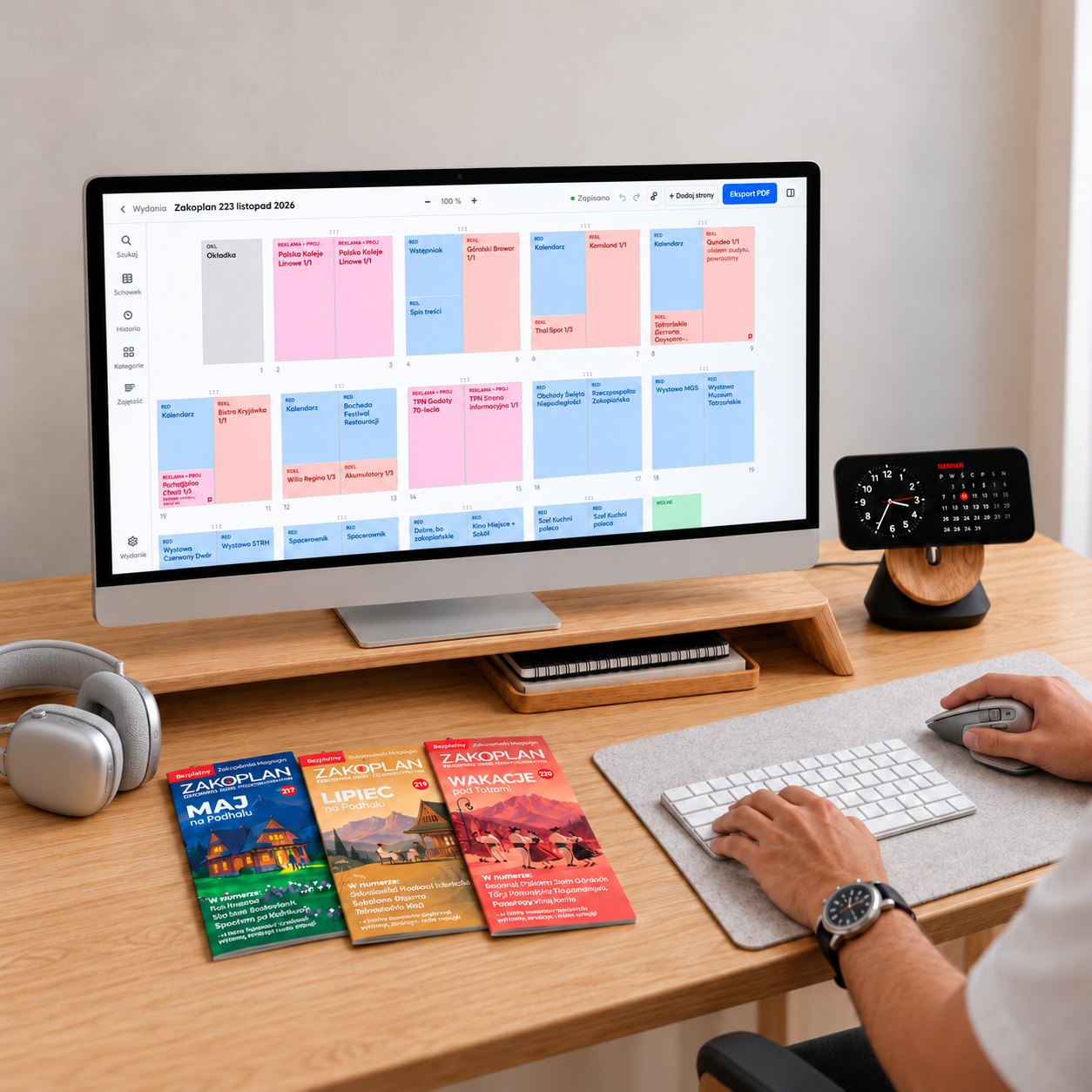
A publisher’s desk: an issue flatplan in Papelot on the screen, with three issues of Zakoplan beside it

Data security

Is my flatplan safe?

Yes! Looking after our users’ data is our priority — on the free plan, too.

Autosave

Saved after every change, with a visible status. If you go offline, changes wait locally.

Version history

Go back to an earlier flatplan — with the name and time of each change.

Export, always

PDF and data export are available on every plan.

Hosted in the European Union

Data is stored in a European data centre, and every team is kept separate from the others.

Pricing

Start for free. Pay as your team grows.

Full pricing and plan comparison
Free €0 1 person · 1 issue · up to 24 pages
Starter €25 / mo excl. VAT billed yearly (€300 a year); €30 billed monthly 3 people · 3 issues · up to 48 pages
ProMost popular €39 / mo excl. VAT billed yearly (€470 a year); €47 billed monthly 6 people · 6 issues · up to 100 pages · no Papelot logo
Studio €49 / mo excl. VAT billed yearly (€590 a year); €59 billed monthly 9 people · 9 issues · up to 300 pages · collections

Prices in euros, excluding VAT, billed yearly — two months free compared with monthly billing (US dollars on the pricing page). Every payment comes with a VAT invoice. Bigger team? See the custom package on the full pricing page.

FAQ

Questions publishers ask

What is a flatplan?

It’s the plan of an issue: which pages form each spread, where the articles go, where the ads go and how much space is left. Some newsrooms call it a page plan or a ladder. Papelot is a tool for planning it.

Does Papelot replace InDesign?

No. Papelot plans what goes where; you lay out the pages just as you do now. The PDF from Papelot is an issue plan for editors and advertisers, not a production file for the printer.

What kinds of publications is it for?

Weeklies and monthlies, guidebooks, local newspapers, catalogues, brochures, company and university newsletters, zines. Any page size, any binding.

How is Papelot different from other tools?

A free plan, a position lock that also guards against indirect shifts, a phone preview and proper VAT invoices. We’re preparing a full comparison for the knowledge base.

How do the free plan and the 14-day full version work?

Sign up without a card and you get the full Studio plan for 14 days. After that, your account moves to Free. Your data stays; issues over the limit are read-only until you choose a plan.

Can I work as a team?

Yes. Admin, editor and guest roles, plus collections on Studio — separate titles or clients within one team, with access set per collection.

Plan your next issue in Papelot

A free account in a minute, no card needed. Your first 14 days come with the full Studio plan.

Create a free account